
Security
Security Knowledge Basics for Faster Alarm Troubleshooting
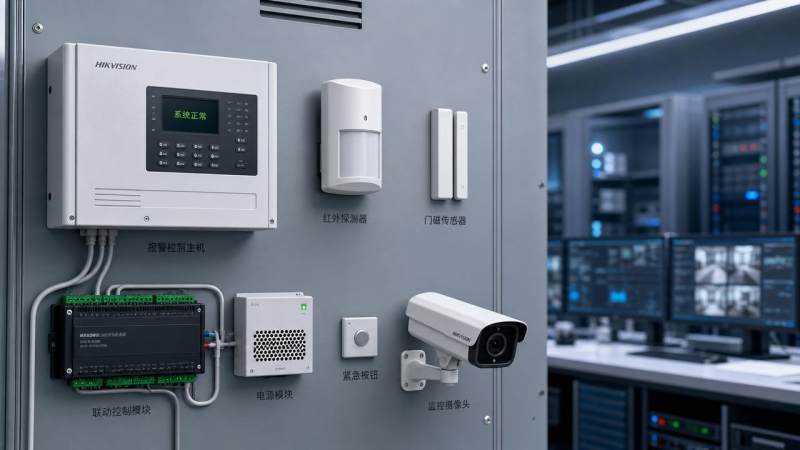
For after-sales maintenance teams, fast alarm troubleshooting starts with solid security knowledge. From understanding detector logic and wiring behavior to identifying false triggers caused by environmental or optical factors, the right foundation reduces downtime and service costs. This guide introduces the essential concepts that help technicians diagnose issues more efficiently, improve response accuracy, and support safer, more reliable system performance in modern security environments.
Why does security knowledge matter so much in alarm troubleshooting?
For after-sales teams, alarm service is rarely just about replacing a faulty device. Most field failures involve a mix of detector behavior, installation quality, environmental conditions, power stability, communication integrity, and user operation. Strong security knowledge helps technicians separate real intrusion events from technical faults without wasting time on guesswork.
This matters even more in mixed-use projects such as warehouses, offices, construction sites, campuses, retail chains, and public facilities. Different spaces create different alarm patterns. A passive infrared detector in a hot mechanical room behaves differently from one in a climate-controlled corridor. A camera-linked alarm in poor lighting can also produce misleading event records if optical conditions are ignored.
In the broader market, maintenance personnel are under pressure from tighter service-level agreements, leaner spare-part budgets, and rising compliance expectations. GSIM supports this work by connecting physical security assurance with optical environment optimization, which is especially useful when alarm faults are linked to visibility, glare, reflections, or changing illumination.
- Faster fault isolation reduces unnecessary site revisits and lowers total service cost.
- Better event interpretation improves technician credibility with end users and facility managers.
- Accurate root-cause analysis helps teams decide whether to repair, recalibrate, relocate, or upgrade equipment.
- Good security knowledge supports safer systems by preventing repeated nuisance alarms and missed genuine events.
What basic security knowledge should every maintenance technician master?
A strong troubleshooting foundation begins with understanding how alarm systems detect, transmit, classify, and report events. Many service delays happen because technicians focus on one device instead of the whole signal path. In practice, troubleshooting should start at the event source and continue through power, wiring, control logic, communication, and integration points.
Core concepts that affect alarm diagnosis
- Detection logic: Know the difference between motion, door contact, glass-break, vibration, smoke, heat, and beam-based triggering mechanisms.
- Zone behavior: Understand how normally open, normally closed, end-of-line, and double end-of-line supervision influence fault interpretation.
- Power conditions: Low voltage, voltage drop, battery aging, poor grounding, and unstable auxiliary power often create intermittent alarms.
- Transmission path: A healthy detector can still produce alarm loss if the panel input, communication bus, or network uplink is unstable.
- Environmental triggers: Sunlight, HVAC airflow, insects, dust, steam, vibration, reflective surfaces, and changing light levels can all cause false events.
- Optical conditions: For video-linked or vision-assisted alarms, contrast, backlight, glare, shadows, and nighttime illumination directly affect event reliability.
Technicians who combine electronic security knowledge with illumination awareness usually solve alarms faster. This is one of the practical reasons GSIM’s intelligence model is relevant: many modern faults are not purely electrical or purely software-related. They sit at the intersection of physical security devices and optical operating conditions.
How to troubleshoot alarms faster: a field-ready workflow
A repeatable process prevents missed steps and reduces the risk of replacing the wrong part. The workflow below is useful across integrated security environments, including intrusion systems connected to CCTV, access control, or central monitoring platforms.
- Verify the event record. Check time stamp, zone number, alarm type, recurrence pattern, and whether other linked systems logged related activity.
- Inspect the environment first. Confirm temperature swings, direct sunlight, moving objects, poor lighting, condensation, insects, and recent layout changes.
- Test power and wiring. Measure supply voltage at the device, not only at the panel. Look for loose terminals, cable damage, corrosion, or induced interference.
- Validate detector behavior. Trigger the sensor under controlled conditions and compare real response to expected logic and sensitivity settings.
- Check panel programming and reporting rules. Delays, cross-zoning, pulse count, schedule settings, and integration scripts may be the actual cause.
- Decide the corrective action. Clean, reposition, shield, recalibrate, rewire, replace, or propose an upgrade if the installed technology no longer fits the site.
This workflow works best when technicians document both the fault and the surrounding optical environment. A recurring nighttime alarm, for example, may only appear after new LED floodlights are installed nearby. Without that context, the same site may receive repeated service calls with no durable fix.
Which alarm symptoms usually point to which root causes?
The table below summarizes common alarm symptoms and the most likely technical directions to investigate. This kind of structured security knowledge helps maintenance staff prioritize checks instead of testing randomly.
A key lesson from this comparison is that the same symptom can have both electrical and environmental causes. Maintenance teams that apply broader security knowledge, including optical assessment, can usually reach the root cause in fewer test cycles.
What should maintenance teams check when selecting replacement devices?
After-sales troubleshooting often leads to a replacement decision. However, a like-for-like swap is not always the best answer. If the original technology was poorly matched to the site, the fault may return. Selection should therefore consider not only compatibility, but also environment, service frequency, and future integration needs.
Replacement and upgrade criteria
- Electrical compatibility with existing panel zones, supervision method, and power budget.
- Environmental fit for indoor, semi-outdoor, dusty, humid, high-bay, or vibration-prone spaces.
- Sensitivity control options that allow practical tuning after installation.
- Resistance to nuisance conditions such as pets, insects, temperature fluctuation, or moving air.
- Integration value if linked to video verification, access logs, or remote maintenance reporting.
The following table helps maintenance personnel compare common selection priorities when security knowledge must be translated into a practical procurement decision.
For cross-border or large public projects, technicians should also confirm documentation and applicable standards before ordering replacements. GSIM’s Strategic Intelligence Center is particularly valuable here because it links sector news, compliance interpretation, and procurement insight instead of treating them as separate issues.
How do standards, compliance, and optical conditions affect alarm reliability?
Maintenance teams often focus on immediate repair, but recurring alarm issues are frequently tied to design assumptions that no longer match regulatory or operational reality. In electronic surveillance and alarm-linked monitoring, regional compliance can affect retention practices, reporting workflows, device placement, and even acceptable use of illumination in public-facing areas.
Practical compliance checkpoints
- Verify whether the replacement or adjustment changes the approved system scope in a regulated project.
- Check if detector placement and linked camera views still align with site policy and local surveillance rules.
- Review lighting changes that may improve image verification but create glare, hotspots, or safety complaints.
- Confirm maintenance records are detailed enough for audit trails, insurance review, or incident reconstruction.
Optical conditions deserve special attention because illumination upgrades are common in smart buildings and urban safety projects. New LED sources, reflective cladding, temporary work lights, and VLC-related infrastructure can alter detection behavior or camera verification quality. Good security knowledge now requires technicians to read both the alarm circuit and the light environment.
Common mistakes that slow alarm troubleshooting
Even experienced teams lose time when they assume every alarm is caused by a failed detector. In reality, poor process discipline is one of the biggest service bottlenecks. The mistakes below appear across many sectors, from commercial facilities to public infrastructure projects.
- Replacing devices before checking voltage at the field end under actual load conditions.
- Ignoring environmental changes made after commissioning, such as partitions, lighting upgrades, fans, or shelving.
- Treating panel logs as complete truth without verifying detector-side behavior and user operation history.
- Overlooking the impact of optical factors on video-assisted alarm verification and event interpretation.
- Choosing replacements only by price, which can increase repeat service and hidden operational cost.
A disciplined maintenance culture turns security knowledge into measurable response gains. Teams that record root causes, environmental conditions, device age, and corrective action build a stronger service database over time. That information also supports better future procurement decisions.
FAQ for after-sales maintenance teams
How can I tell whether an alarm is false or caused by a real intrusion attempt?
Start by correlating sources. Compare the panel log, video record, access events, and on-site evidence. If alarms repeat at similar times with no physical sign, environmental or configuration causes are more likely. If the event appears irregular and matches other system activity, treat it as potentially genuine until proven otherwise.
Which sites need more advanced security knowledge for troubleshooting?
Sites with mixed technologies, unstable lighting, outdoor transitions, high ceilings, large glass areas, or integrated monitoring need deeper diagnostic skill. Smart construction sites, logistics facilities, campuses, and public safety environments are typical examples because alarm performance depends on both device logic and changing scene conditions.
What should I prioritize when budget is limited?
Prioritize the root cause with the biggest repeat-service impact. Often this means fixing power quality, wiring integrity, detector placement, or lighting conditions before buying more expensive devices. If replacement is required, choose models that reduce nuisance alarms and simplify future maintenance rather than only lowering initial cost.
When is an upgrade better than a direct replacement?
An upgrade makes sense when the original device type no longer fits the environment, when repeated false alarms consume service resources, or when the site now requires better integration with video verification, remote diagnostics, or compliance reporting. This is common in facilities undergoing digital infrastructure modernization.
Why choose us for security knowledge support and troubleshooting decisions?
GSIM is built for professionals who need more than general product descriptions. We connect physical security assurance with optical environment optimization, helping after-sales maintenance teams interpret alarm problems in a way that matches today’s integrated security reality. Our Strategic Intelligence Center supports practical decision-making through policy insight, technology trend analysis, and procurement-oriented market visibility.
If your team is dealing with recurring false alarms, unclear replacement choices, cross-border compliance questions, or lighting-related verification issues, you can consult GSIM for focused support. Typical discussion points include parameter confirmation, product selection logic, delivery cycle planning, customized solution direction, certification requirements, sample evaluation, and quotation alignment for upcoming maintenance or upgrade projects.
For organizations facing 2026 digital infrastructure and urban safety upgrades, timely security knowledge is not a side resource. It is part of operational resilience. GSIM helps maintenance teams move from reactive repair to informed, standards-aware troubleshooting that supports safer performance and better long-term procurement outcomes.
The VitalSync Intelligence Brief
Receive daily deep-dives into MedTech innovations and regulatory shifts.